---
title: Create click-to-call or mailto links
description: With a click-to-call button, website visitors on a mobile device can call your business with a single tap. With a mailto link, visitors can compose a new email in their default program with a specific
---
[Skip to content](https://knowledge.performars.com/migration/en/hubspot/create-click-to-call-or-mailto-links#main-content)
- [English](https://knowledge.performars.com/migration/en/hubspot/create-click-to-call-or-mailto-links)
- [한국어](https://knowledge.performars.com/migration/ko/hubspot/click-to-call-또는-mail-to-link-생성)
English
Show submenu for translations
![performars\_blog\_logo-3.png\]](https://knowledge.performars.com/hs-fs/hubfs/Icons%20and%20Logos/performars_blog_logo-3.png?height=40&name=performars_blog_logo-3.png)
Open main navigation
Close main navigation
- - [English](https://knowledge.performars.com/migration/en/hubspot/create-click-to-call-or-mailto-links)
- [한국어](https://knowledge.performars.com/migration/ko/hubspot/click-to-call-또는-mail-to-link-생성)
English
Show submenu for translations
- For your digital growth
For your digital growth
Hello, how can I help you?
- There are no suggestions because the search field is empty.
1. [MarTech Knowledge Center](https://knowledge.performars.com/migration/en?hsLang=en)
2. [HubSpot Website](https://knowledge.performars.com/migration/en/hubspot-website?hsLang=en)
3. [Website pages](https://knowledge.performars.com/migration/en/hubspot-website?hsLang=en#website-pages)
# Create click-to-call or mailto links
With a click-to-call button, website visitors on a mobile device can call your business with a single tap. With a mailto link, visitors can compose a new email in their default program with a specific recipient, subject line, or email body.
You can add these types of links to a [call-to-action (CTA)](https://knowledge.hubspot.com/cta-user-guide-v2/how-to-create-a-call-to-action-cta-in-hubspot) or [rich text module](https://knowledge.hubspot.com/articles/kcs_article/cos-pages-editor/how-do-i-insert-a-link-on-a-hubspot-page) in your HubSpot content. You can also add these link types manually in other content types, such as a [one-to-one email](https://knowledge.hubspot.com/email/send-and-reply-to-one-to-one-emails).
#### Create a click-to-call link
### Add a click-to-call link
- Within your content, highlight the **text** or **image** you want to use for your click-to-call link.
- Click the **link icon** link in the rich text toolbar.
- Enter **tel:5555555555** in the *URL* field, replacing *5555555555* with the phone number for your business. You don't need to select the **Open link in new window** checkbox, since this type of link will open the visitor's default calling program on their device.
**Please note:** there can't be any spaces or dashes in the click-to-call link.
- Click **Add link**.
- Publish your changes by clicking **Publish** in the upper right.
### Add a click-to-call link to a CTA
- In your HubSpot account, navigate to **Marketing** \> **Lead Capture** \> **CTAs**.
- To edit an existing CTA, hover over the CTA you want to edit, then click **Actions**, then select **Edit**. Or, create a new CTA by clicking **Create CTA** in the upper right.
- After choosing your CTA design, click **Next** in the bottom right to configure your CTA options.
- Click the **URL redirect type** dropdown menu to select **Phone number**.
- Select the **country code** and enter the **phone number** for your business.

- Click **Save**.
#### Create a mailto link
A mailto link will open the visitor's default email program on their device and compose a new email to a specific email address. You can add a mailto link using the link feature in any rich text module or CTA.
If you're not using a rich text module or a CTA, you can create a mailto link manually instead. Highlight the text you want to link, then enter: **mailto:someone@example.com** for your link.
### Add an email subject line to your mailto link
You can modify any mailto link to generate an email with a specific email subject line. Since links can't contain any spaces, you'll include *%20* in place of each space. The %20 will render as a space in the email subject line when the mailto link is clicked.
For example, if you wanted to create a mailto link that generated an email with the subject line: *Start of Springtime Sale*, you'd add %20 in place of each space, like this:
*contact@domain.com?subject=Start%20of%20Springtime%20Sale*
### Add a mailto link in a rich text module
- In your HubSpot content, highlight the **text** or **image** you want to link to your mailto link.
- Click the link **link icon**.
- Click the **Link to** dropdown menu and select **Email address**. The email address entered here will appear in the *To* field of the email that's composed when a visitor clicks this link.
- You can also use a mailito link to set a specific subject line or email body.
- Click the **Link to** dropdown menu and select **Email address**.
- Enter an **email address** followed by **?subject=** to edit the subject line or **?body=** to edit the email body when a visitor clicks the mailito link.
### Add a mailto link to a CTA
- In your HubSpot account, navigate to **Marketing** \> **Lead Capture** \> **CTAs**.
- Click **Create CTA**.
- After customizing your CTA design, click **Next** to configure your CTA options.
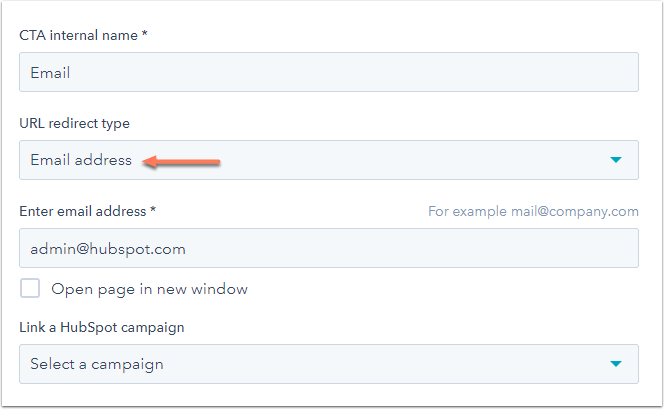
- Click the **URL redirect type** dropdown menu and select **Email address**.
- Enter the **email address** for the *To* field of the email that's composed when a visitor clicks this CTA.
- Click **Save**.
[](https://knowledge.hubspot.com/cs/c/?cta_guid=6692b52d-b8b3-452c-b4a6-f863f529ec74&signature=AAH58kGcBJ2LjQXnJq0OO01vuQSlIebKbg&pageId=3515518180&placement_guid=a9f525cf-42d1-481b-a01f-2a923ebf558d&click=2b3a96b0-4083-4928-9a4b-28737f5da6e6&hsutk=ed969157a97f8c6bf630f48c1fad5a41&canon=https%3A%2F%2Fknowledge.hubspot.com%2Fcos-general%2Fhow-to-make-a-click-to-call-button-for-your-website&portal_id=53&redirect_url=APefjpFDg2I_e4LmBGPfCY5tu93rAZoZ2gO84PNz59YG0NNHEnTJBjSYdXTxGC0PokzZIXmcbXtk3Oo0j1v621HCCxmhFcsj4REW0vkSku43lwpIWAbwuvkv0C4mc881jpKSOQRDZkK-wDZe8SH7aJWv2g3iS9JrAlBso_mmSRy8M7-lnfRAwUwAeBws9ZHcdymRUFdXmsJkgZAVYHScUecpSn9mhKmbq2f-4CnYVaznRTjX8hOsrdwfnYlz0DMgUzn_PicF-F5ujnM8XjFiNAOqiUlv3AHhAKo4qNrhz9sSrKLcj243VRu4ShlwJR6oyoUXjOSCDK2J&__hstc=20629287.ed969157a97f8c6bf630f48c1fad5a41.1616904297612.1619948160483.1619959957249.31&__hssc=20629287.5.1619959957249&__hsfp=1700017138&contentType=blog-post)
- [HubSpot Account & Setup](https://knowledge.performars.com/migration/en/hubspot-account-setup?hsLang=en#main-content)
- [Account setting](https://knowledge.performars.com/migration/en/hubspot-account-setup?hsLang=en#account-setting)
- [Billing](https://knowledge.performars.com/migration/en/hubspot-account-setup?hsLang=en#billing)
- [HubSpot Chat & Automation](https://knowledge.performars.com/migration/en/hubspot-chat-automation?hsLang=en#main-content)
- [Workflow](https://knowledge.performars.com/migration/en/hubspot-chat-automation?hsLang=en#workflow)
- [Feedback Survey](https://knowledge.performars.com/migration/en/hubspot-chat-automation?hsLang=en#feedback-survey)
- [HubSpot Sales Tools](https://knowledge.performars.com/migration/en/hubspot-sales-tools?hsLang=en#main-content)
- [Calling](https://knowledge.performars.com/migration/en/hubspot-sales-tools?hsLang=en#calling)
- [Document](https://knowledge.performars.com/migration/en/hubspot-sales-tools?hsLang=en#document)
- [Forecast](https://knowledge.performars.com/migration/en/hubspot-sales-tools?hsLang=en#forecast)
- [HubSpot Website](https://knowledge.performars.com/migration/en/hubspot-website?hsLang=en#main-content)
- [Domains & URL](https://knowledge.performars.com/migration/en/hubspot-website?hsLang=en#domains-url)
- [SEO](https://knowledge.performars.com/migration/en/hubspot-website?hsLang=en#seo)
- [Website pages](https://knowledge.performars.com/migration/en/hubspot-website?hsLang=en#website-pages)
- [Mixpanel Data and Implementation](https://knowledge.performars.com/migration/en/mixpanel-data-and-implementation?hsLang=en#main-content)
- [Mixpanel Web Tracking](https://knowledge.performars.com/migration/en/mixpanel-data-and-implementation?hsLang=en#mixpanel-web-tracking)
- [Mixpanel Analysis](https://knowledge.performars.com/migration/en/mixpanel-analysis?hsLang=en#main-content)
- [Mixpanel Funnels](https://knowledge.performars.com/migration/en/mixpanel-analysis?hsLang=en#mixpanel-funnels)
- [OneSignal Onboarding](https://knowledge.performars.com/migration/en/onesignal-onboarding?hsLang=en#main-content)
- [Onboarding with OneSignal](https://knowledge.performars.com/migration/en/onesignal-onboarding?hsLang=en#onboarding-with-onesignal)
[](https://www.performars.com?hsLang=en)
Growth by MarTech
Copyright © 2026, 퍼포마스(주)