---
title: View SEO recommendations in HubSpot
description: Following SEO best practices leads to more organic traffic to your website over time. SEO recommendations can be viewed for your overall website or on a page by page basis. Learn more about specific S
---
[Skip to content](https://knowledge.performars.com/migration/en/hubspot/view-seo-recommendations-in-hubspot#main-content)
- [English](https://knowledge.performars.com/migration/en/hubspot/view-seo-recommendations-in-hubspot)
- [한국어](https://knowledge.performars.com/migration/ko/hubspot/hubspot에서-seo-권장사항-보기)
English
Show submenu for translations
![performars\_blog\_logo-3.png\]](https://knowledge.performars.com/hs-fs/hubfs/Icons%20and%20Logos/performars_blog_logo-3.png?height=40&name=performars_blog_logo-3.png)
Open main navigation
Close main navigation
- - [English](https://knowledge.performars.com/migration/en/hubspot/view-seo-recommendations-in-hubspot)
- [한국어](https://knowledge.performars.com/migration/ko/hubspot/hubspot에서-seo-권장사항-보기)
English
Show submenu for translations
- For your digital growth
For your digital growth
Hello, how can I help you?
- There are no suggestions because the search field is empty.
1. [MarTech Knowledge Center](https://knowledge.performars.com/migration/en?hsLang=en)
2. [HubSpot Website](https://knowledge.performars.com/migration/en/hubspot-website?hsLang=en)
3. [SEO](https://knowledge.performars.com/migration/en/hubspot-website?hsLang=en#seo)
# View SEO recommendations in HubSpot
Following SEO best practices leads to more [organic traffic](https://knowledge.hubspot.com/articles/kcs_article/reports/analyze-data-in-the-sources-report#organic-search) to your website over time. SEO recommendations can be viewed for your overall website or on a page by page basis. Learn more about [specific SEO recommendations](http://www.knowledge.hubspot.com/understand-seo-recommendations).
All HubSpot accounts have access to SEO recommendations in the page editor. [SEO topics](https://knowledge.hubspot.com/content-strategy/create-topics) and the recommendations in the SEO tool are available for ***Marketing Hub** Professional* and *Enterprise* accounts and ***CMS Hub** Professional* and *Enterprise* accounts only*.*
**Please note:** the HTML content of a page or blog post does not include assets loaded over a script, like [CTAs](https://knowledge.hubspot.com/articles/kcs_article/ctas/create-calls-to-action-ctas).
#### View SEO recommendations for all pages
In the SEO tool, you can scan all live pages for SEO recommendations, including pages hosted outside of HubSpot. Depending on the size of your site, the scanning process can take up to six hours. SEO recommendations in the SEO tool are grouped by category and listed in order of priority.
- In your HubSpot account, navigate to **Marketing** \> **Planning and Strategy** \> **SEO**.
- Scan a domain for recommendations:
- To scan a new domain, in the upper right, click **Scan new URL.** In the dialog box, enter a **URL** for your website and click **Scan URL**.
- To scan a previously added domain, under the domain name, click **Rescan now**.
- When the scan is finished, hover over a [subdomain](https://knowledge.hubspot.com/domains-and-urls/host-content-on-multiple-subdomains) and click **View recommendations**.

- On the recommendations page, click a **category** in the left sidebar menu to view more recommendations.
- To see specific pages for a recommendation, click **View pages**.
- To fix a HubSpot-hosted page or blog post, click **Fix in editor**.
- To fix a page hosted outside of HubSpot, click the **page URL** to navigate to the page.
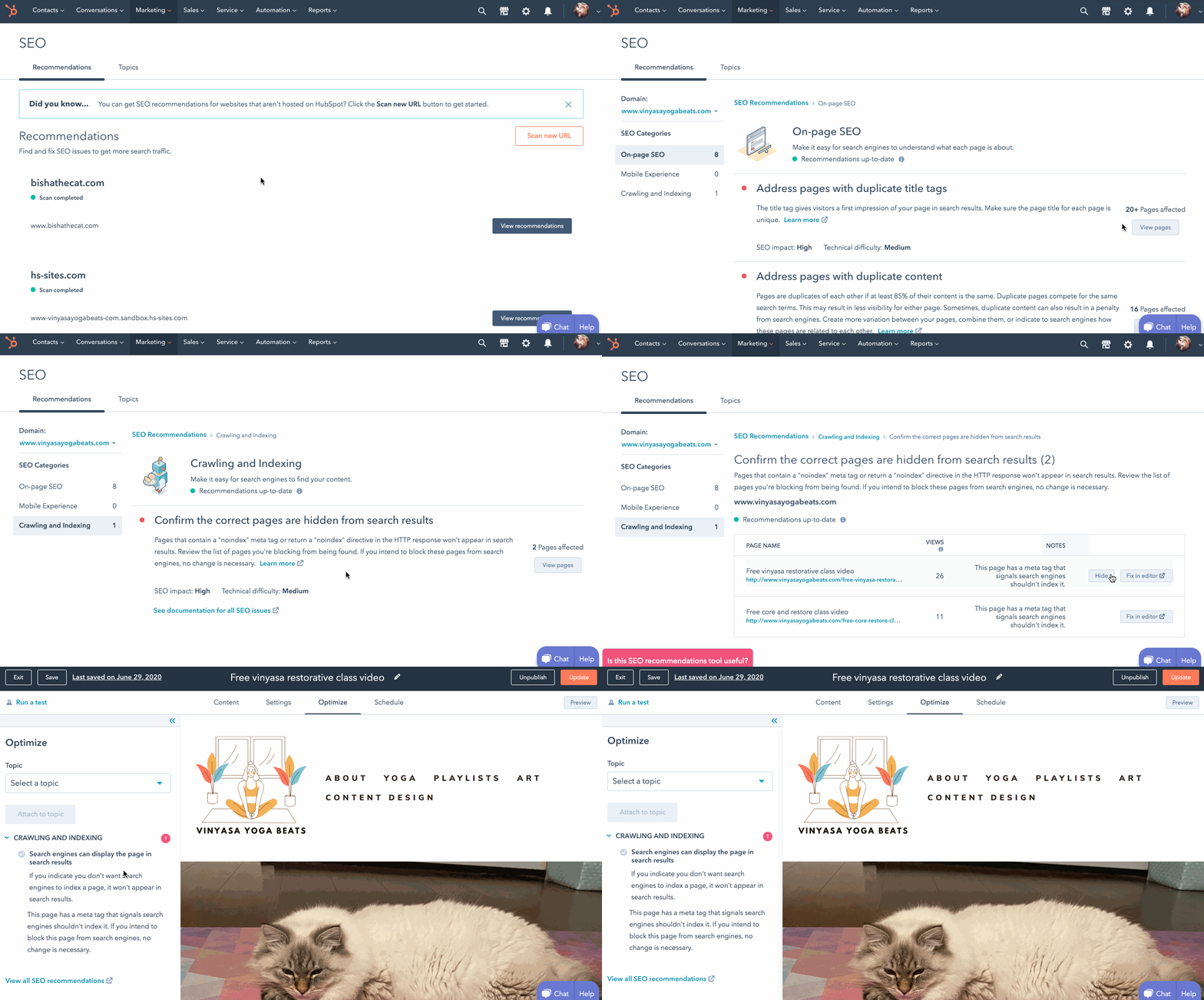
- To hide a recommendation, hover over a specific page and click **Hide**. In the dialog box, select a **reason** for hiding the recommendation, then click **Hide**.
- To unhide page recommendations, click **Show all hidden recommendations** at the bottom of the page.

#### View SEO recommendations for a specific page or blog post
You can also view some recommendations for a specific page or blog post in the content editor or its details page.
### View recommendations in the content editor
- In your HubSpot account, [navigate to your website pages, landing pages, or blog](https://knowledge.hubspot.com/account/a-guide-to-hubspots-new-navigation).
- Hover over a page or blog post and click **Edit**.
- Navigate to the **Optimize** tab.
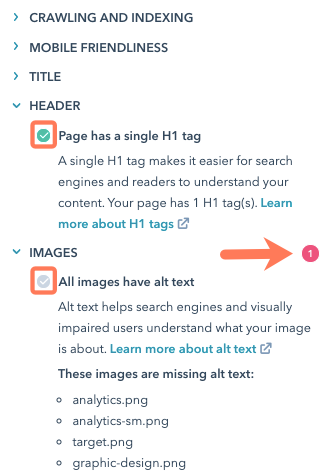
- In the left sidebar menu, click a **category** with a red circle to see incomplete recommendations. Each completed recommendation will have a green checkmark. Each incomplete recommendation will have a grey checkmark.
### View recommendations in page or post details
In the *Optimization* tab, you'll find recommendations to improve your content's performance in search engine results.
- In your HubSpot account, [navigate to your website pages, landing pages, or blog](https://knowledge.hubspot.com/account/a-guide-to-hubspots-new-navigation).
- Click the **name** of a published page or blog post
- On the page details page, navigate to the **Optimization** tab. In the left sidebar menu, select an SEO metric to analyze:
- **Search Queries:** search queries that are returning your content in Google search results. This data is only available if you're using the [Google Search Console integration.](https://knowledge.hubspot.com/articles/kcs_article/content-strategy/enable-the-google-search-console-integration-for-your-content-strategy-tool)
- **On Page SEO:** SEO recommendations for your content. Click **Rescan now** to scan the page for recommendations. This process can take several minutes.
- **Inbound Links:** links to this page from external websites.
- **Internal Links:** links to this page from other parts of your website. Internal links show search engines how your content is organized around [topics](https://knowledge.hubspot.com/articles/kcs_article/content-strategy/create-topics).

- [HubSpot Account & Setup](https://knowledge.performars.com/migration/en/hubspot-account-setup?hsLang=en#main-content)
- [Account setting](https://knowledge.performars.com/migration/en/hubspot-account-setup?hsLang=en#account-setting)
- [Billing](https://knowledge.performars.com/migration/en/hubspot-account-setup?hsLang=en#billing)
- [HubSpot Chat & Automation](https://knowledge.performars.com/migration/en/hubspot-chat-automation?hsLang=en#main-content)
- [Workflow](https://knowledge.performars.com/migration/en/hubspot-chat-automation?hsLang=en#workflow)
- [Feedback Survey](https://knowledge.performars.com/migration/en/hubspot-chat-automation?hsLang=en#feedback-survey)
- [HubSpot Sales Tools](https://knowledge.performars.com/migration/en/hubspot-sales-tools?hsLang=en#main-content)
- [Calling](https://knowledge.performars.com/migration/en/hubspot-sales-tools?hsLang=en#calling)
- [Document](https://knowledge.performars.com/migration/en/hubspot-sales-tools?hsLang=en#document)
- [Forecast](https://knowledge.performars.com/migration/en/hubspot-sales-tools?hsLang=en#forecast)
- [HubSpot Website](https://knowledge.performars.com/migration/en/hubspot-website?hsLang=en#main-content)
- [Domains & URL](https://knowledge.performars.com/migration/en/hubspot-website?hsLang=en#domains-url)
- [SEO](https://knowledge.performars.com/migration/en/hubspot-website?hsLang=en#seo)
- [Website pages](https://knowledge.performars.com/migration/en/hubspot-website?hsLang=en#website-pages)
- [Mixpanel Data and Implementation](https://knowledge.performars.com/migration/en/mixpanel-data-and-implementation?hsLang=en#main-content)
- [Mixpanel Web Tracking](https://knowledge.performars.com/migration/en/mixpanel-data-and-implementation?hsLang=en#mixpanel-web-tracking)
- [Mixpanel Analysis](https://knowledge.performars.com/migration/en/mixpanel-analysis?hsLang=en#main-content)
- [Mixpanel Funnels](https://knowledge.performars.com/migration/en/mixpanel-analysis?hsLang=en#mixpanel-funnels)
- [OneSignal Onboarding](https://knowledge.performars.com/migration/en/onesignal-onboarding?hsLang=en#main-content)
- [Onboarding with OneSignal](https://knowledge.performars.com/migration/en/onesignal-onboarding?hsLang=en#onboarding-with-onesignal)
[](https://www.performars.com?hsLang=en)
Growth by MarTech
Copyright © 2026, 퍼포마스(주)