---
title: Manage your user profile and preferences
description: In settings, you can manage your personal account preferences, such as your language, default home page, and CRM communication settings. These settings will only affect your user. For other personal
---
[Skip to content](https://knowledge.performars.com/migration/en/manage-your-user-profile-and-preferences#main-content)
- [English](https://knowledge.performars.com/migration/en/manage-your-user-profile-and-preferences)
- [한국어](https://knowledge.performars.com/migration/ko/사용자-프로필-및-기본-설정을-관리하세요)
English
Show submenu for translations
![performars\_blog\_logo-3.png\]](https://knowledge.performars.com/hs-fs/hubfs/Icons%20and%20Logos/performars_blog_logo-3.png?height=40&name=performars_blog_logo-3.png)
Open main navigation
Close main navigation
- - [English](https://knowledge.performars.com/migration/en/manage-your-user-profile-and-preferences)
- [한국어](https://knowledge.performars.com/migration/ko/사용자-프로필-및-기본-설정을-관리하세요)
English
Show submenu for translations
- For your digital growth
For your digital growth
Hello, how can I help you?
- There are no suggestions because the search field is empty.
1. [MarTech Knowledge Center](https://knowledge.performars.com/migration/en?hsLang=en)
2. [HubSpot Account & Setup](https://knowledge.performars.com/migration/en/hubspot-account-setup?hsLang=en)
3. [Account setting](https://knowledge.performars.com/migration/en/hubspot-account-setup?hsLang=en#account-setting)
# Manage your user profile and preferences
#### APPLIES TO:
| [All products and plans](https://www.hubspot.com/products/crm) |
| --- |
In settings, you can manage your personal account preferences, such as your language, default home page, and CRM communication settings. These settings will only affect your user.
For other personal settings, learn how to [customize your CRM email signature](https://knowledge.hubspot.com/account/add-an-email-signature-in-the-crm).
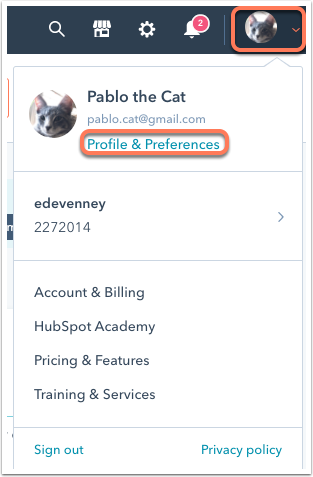
To navigate to your account preferences, click your **profile picture** in the top right corner, then click **Profile & Preferences**. This will take you to the *General* section of account settings.
#### Global
Manage the settings that apply to your user across all your accounts.
### Profile image and user name
The profile image, first name, and last name associated with a HubSpot user can only be changed by the user themselves. Users cannot make edits to other users' names, even if they have the [*Add and edit users* permission](https://knowledge.hubspot.com/settings/hubspot-user-permissions-guide#account).
If you're looking to update your user email address, check out HubSpot's guide on [changing your email address](https://knowledge.hubspot.com/account/how-do-i-change-the-email-address-of-a-user).
To change your profile image and user name:
- Click your current **profile image**, then select from the available options:
- To upload a new image from your computer, select **Upload image**. Then select your image and use the **slider** to adjust the image size so that it fits in the circle. To save your changes, click **Save**.
- To use a Gravatar photo, select **Use Gravatar**. If you don't have a Gravatar photo yet, you can click **Set up Gravatar photo** to add one. [Learn more about Gravatar](https://gravatar.com/).
- To remove the current avatar image, select **Remove image**.
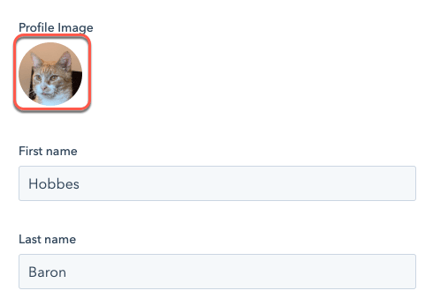
- Click the **First name** and **Last name** fields, then enter your name.
- Click **Save**.
### Language and date & number format
The language setting controls the language that displays in HubSpot's user interface. This setting will not adjust the language in the HubSpot mobile app. To change the mobile app language, adjust your [iPhone](https://support.apple.com/en-us/ht204031) or [Android](https://support.google.com/android/answer/6073614?hl=en&ref_topic=7355552&authuser=0&__hstc=20629287.22e5bb4123b8146ab7bdd3b582834624.1609209577876.1616549921869.1616552764270.8&__hssc=20629287.5.1616552764270&__hsfp=1649433455) language settings.
Learn more about [HubSpot's language offerings](https://knowledge.hubspot.com/account/hubspot-language-offerings).
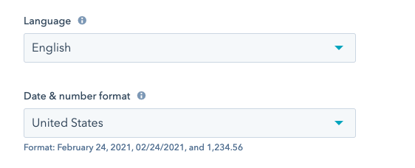
To change the language and number format that displays in HubSpot:
- Click the **Language** dropdown menu and select a **language**. Switching your language will automatically adjust your *Date & number* format.
- To change the date and number format, click the **Date & number format** dropdown menu, then select a **region**.
### Phone number
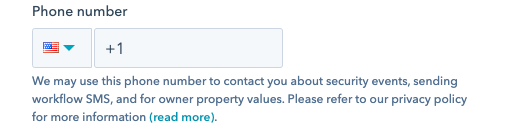
To set the phone number that's used for [workflow SMS notifications](https://knowledge.hubspot.com/workflows/choose-your-workflow-actions#send-an-internal-sms), security events, and owner property values, enter a **phone number** into the phone number field, then click **Save**.
#### Default Home Page
Customize the **sprocket icon** sprocket in the top left corner of your account to navigate to a specific area of HubSpot. This will also set the page that loads when you log in to the account. Default home pages are set per user per account, so you can customize your home page in each account that you're a user in without affecting other users.
To set your default home page, click the **Default Home Page** dropdown menu, then select a **product area**. Your changes will automatically save, but may take a couple minutes to take effect.
- [HubSpot Account & Setup](https://knowledge.performars.com/migration/en/hubspot-account-setup?hsLang=en#main-content)
- [Account setting](https://knowledge.performars.com/migration/en/hubspot-account-setup?hsLang=en#account-setting)
- [Billing](https://knowledge.performars.com/migration/en/hubspot-account-setup?hsLang=en#billing)
- [HubSpot Chat & Automation](https://knowledge.performars.com/migration/en/hubspot-chat-automation?hsLang=en#main-content)
- [Workflow](https://knowledge.performars.com/migration/en/hubspot-chat-automation?hsLang=en#workflow)
- [Feedback Survey](https://knowledge.performars.com/migration/en/hubspot-chat-automation?hsLang=en#feedback-survey)
- [HubSpot Sales Tools](https://knowledge.performars.com/migration/en/hubspot-sales-tools?hsLang=en#main-content)
- [Calling](https://knowledge.performars.com/migration/en/hubspot-sales-tools?hsLang=en#calling)
- [Document](https://knowledge.performars.com/migration/en/hubspot-sales-tools?hsLang=en#document)
- [Forecast](https://knowledge.performars.com/migration/en/hubspot-sales-tools?hsLang=en#forecast)
- [HubSpot Website](https://knowledge.performars.com/migration/en/hubspot-website?hsLang=en#main-content)
- [Domains & URL](https://knowledge.performars.com/migration/en/hubspot-website?hsLang=en#domains-url)
- [SEO](https://knowledge.performars.com/migration/en/hubspot-website?hsLang=en#seo)
- [Website pages](https://knowledge.performars.com/migration/en/hubspot-website?hsLang=en#website-pages)
- [Mixpanel Data and Implementation](https://knowledge.performars.com/migration/en/mixpanel-data-and-implementation?hsLang=en#main-content)
- [Mixpanel Web Tracking](https://knowledge.performars.com/migration/en/mixpanel-data-and-implementation?hsLang=en#mixpanel-web-tracking)
- [Mixpanel Analysis](https://knowledge.performars.com/migration/en/mixpanel-analysis?hsLang=en#main-content)
- [Mixpanel Funnels](https://knowledge.performars.com/migration/en/mixpanel-analysis?hsLang=en#mixpanel-funnels)
- [OneSignal Onboarding](https://knowledge.performars.com/migration/en/onesignal-onboarding?hsLang=en#main-content)
- [Onboarding with OneSignal](https://knowledge.performars.com/migration/en/onesignal-onboarding?hsLang=en#onboarding-with-onesignal)
[](https://www.performars.com?hsLang=en)
Growth by MarTech
Copyright © 2026, 퍼포마스(주)